Bed planner
Draw your plots and paths to scale, drop crops in, and Heirloom works out how many plants fit and how many seeds to sow.
Open the Bed Planner tab next to Reminders.
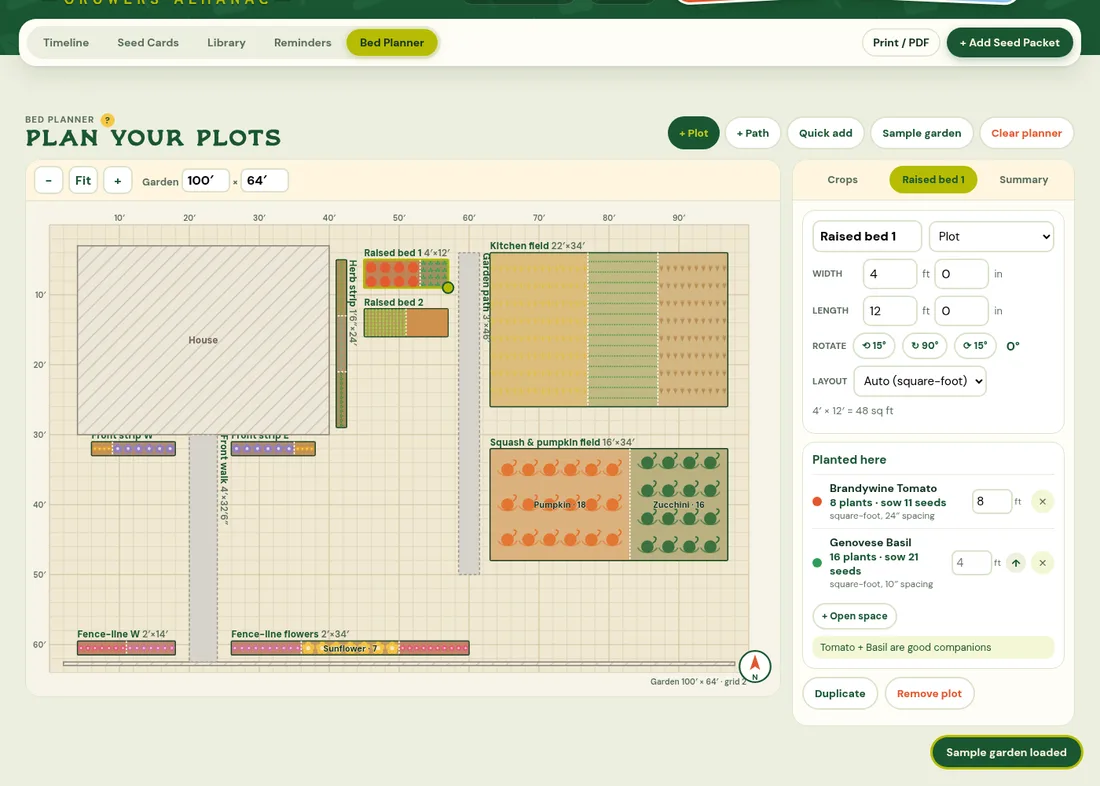
Add plots and paths
Every plantable area is a plot: a raised bed, an in-ground bed, a strip along the fence or a whole field. Use + Plot or + Path, then set the width and length in feet and inches in the plot's panel. Its Layout (square-foot, rows or single row) is picked from its size, and you can change it. Drag a plot to move it, drag its corner handle to resize, and use the rotate buttons (15° or 90°). Everything snaps to a 6-inch grid. Tap the compass to point north.
Leave open space
Not every inch has to be planted. In a plot's panel, press + Open space to keep part of it clear for a walkway or unplanted rows (3 ft to start; type any length). It's drawn hatched and isn't counted in plants or seeds. Use the ↑ buttons to move it (or a crop) up the list, so the walkway sits between crops.
Type in a list of measurements
Quick add takes one plot per line, for example:
Plot A 4x83 @ 4x12(three plots the same size)Back field 50' x 120' rows(field or rows plants it in rows)Front border 2 x 24(words like border, strip or row make a single row)Center path 3 x 30 pathHouse 30 x 40(house, shed, garage, fence or patio is drawn for reference and never planted)Herb bed 3'6" x 10'
A preview shows what will be added before you press Add.
Plant crops
Drag a crop from the Crops list onto a plot (on a phone, tap the crop, then tap the plot). Heirloom fills the plot using the packet's spacing and row spacing from Notes & spacing: small plots (up to 4 ft wide) use square-foot style, bigger plots use rows, and single-row strips get one row at the packet's in-row spacing. You can change this under Layout. Each crop shows the plant count and how many seeds to sow (about 30% extra for germination). Several crops can share a plot; set how many feet of the plot each one gets.
Succession in a plot
If a crop is set to plant again, its plot lists each round in that spot (1/3, 2/3…) with sow and harvest dates. A round that starts before the one before it is harvested is marked overlaps: give it another spot, or switch the crop to After harvest.
Summary and companions
The Summary tab totals plants and seeds per crop across the garden and lists what's in each plot. The plot panel flags good companions (like tomato + basil) and pairs that don't get along.
Start over
Clear planner (top right) removes every plot, path and planting after you confirm, so you can start fresh. Your seeds are not touched.
Saving
Your plan saves in this browser, and to your account when you're signed in, so it follows you to other devices. Sample garden loads an example yard to explore: a house with lavender and marigold strips by the front walk, an herb strip along the side, two square-foot raised beds, a kitchen field and a squash & pumpkin field in rows, and flowers along the front fence.
Plans
The bed planner is part of Annual and Perennial. On Free you can explore the sample garden as a preview. See Plans & billing.