Reading the timeline
What the bars, colors and frost lines on the timeline mean.
The Timeline view shows the whole year, January to December, with one row per crop.
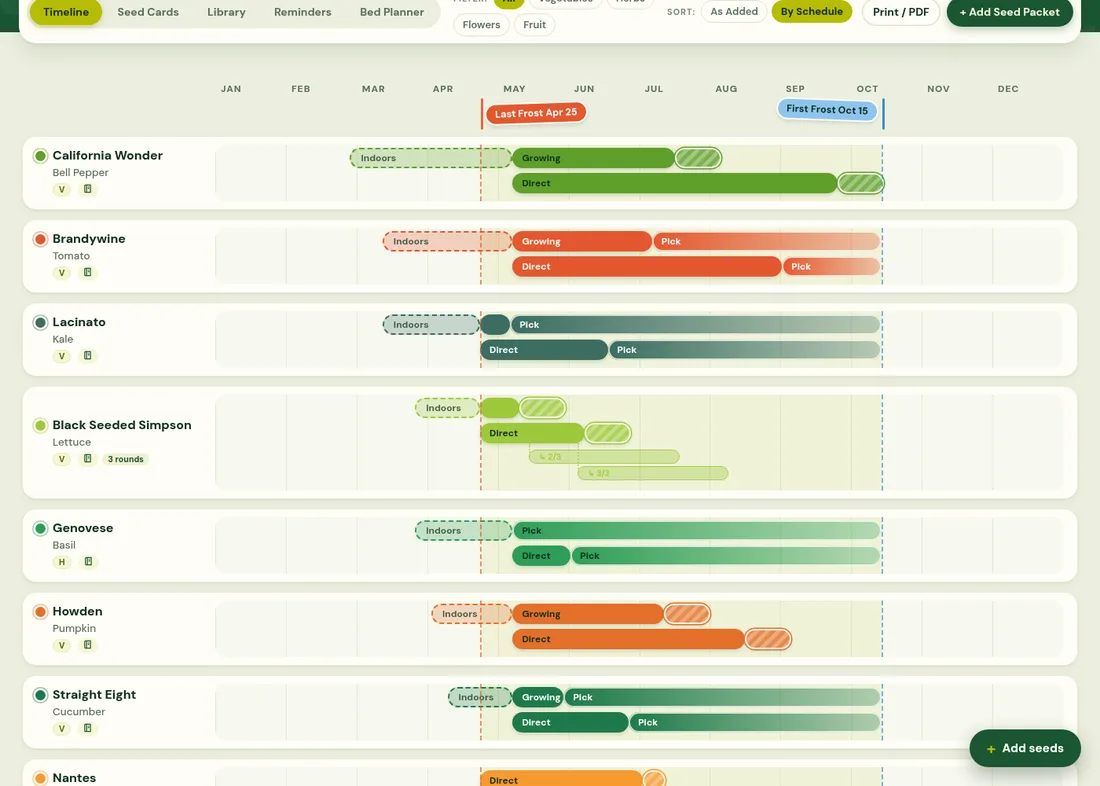
- Dashed bar (Indoors): the window to start seeds inside, counted back from your last frost using the packet's "weeks before frost".
- Growing: transplanted seedlings growing outside.
- Direct: sowing straight into the garden, then growing.
- Pick / striped bar: harvest. Continuous crops (lettuce, tomatoes) get a long picking window; one-time crops a short striped one.
- Lighter bars tagged 2/4, 3/4…: succession rounds, linked to the first planting.
- Red line / blue line: your last spring frost and first fall frost.
The crop label
Under each crop's name are small badges: its type (V vegetable, H herb, F flower or fruit), the notebook button that opens its planting journal, and how many succession rounds it has. Click the crop's name to jump to its Seed Card.
Use Filter to show only vegetables, herbs, flowers or fruit, and Sort to order rows By Schedule (earliest first) or As Added. Hover or tap a bar to see its exact dates. The legend under the timeline names each bar; its ? link opens this page.
Once you mark a crop planted, its row redraws from the date you actually planted it.
Garlic, shallots and other crops planted in fall: see Overwintering crops.